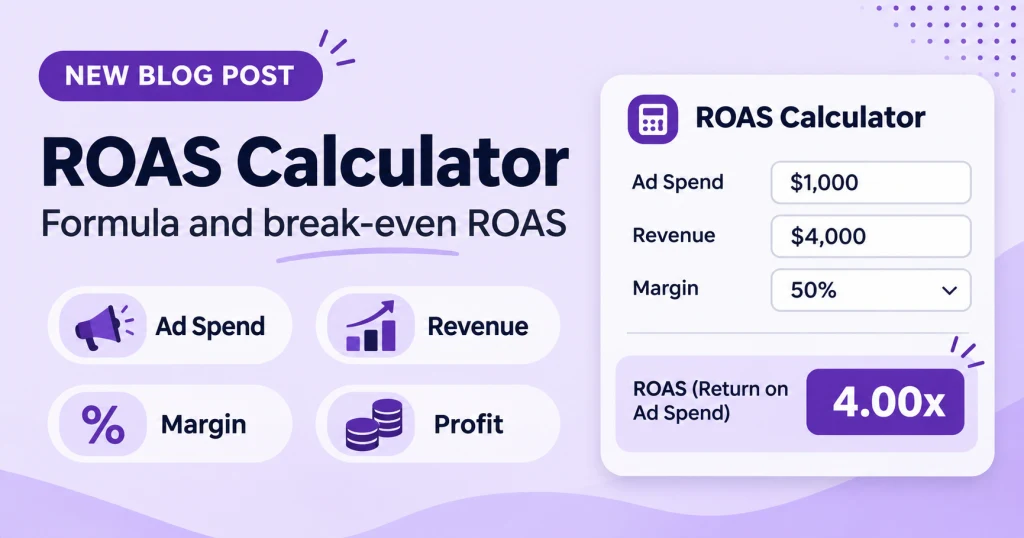
Quick answer: ROAS (return on ad spend) is the revenue your ads generate divided by what you spent on them. If you spend $1,000 and ads bring in $4,000 in sales, your ROAS is 4, which Google Ads shows as 400%. But ROAS measures revenue, not profit, so you also need your break-even ROAS: 1 divided by your gross margin. At a 40% margin, break-even ROAS is 2.5.
ROAS calculator
What is ROAS?
ROAS stands for return on ad spend. It tells you how much revenue you earned for each unit of money spent on advertising. It’s one of the most common numbers in paid media because it’s simple and available in most ad platforms.
The ROAS formula
ROAS = revenue from ads ÷ ad spend
For example, if you spend 10,000 and your ads are credited with 40,000 in sales, your ROAS is 4. In Google Ads you’ll usually see this written as 400%, because the platform shows ROAS as a percentage. A ROAS of 4 and a ROAS of 400% mean the same thing: 4 units of revenue for every 1 spent.
Keep in mind that ROAS depends on which sales the platform credits to your ads. That’s why accurate tracking matters, which we cover in our guide to Google Ads conversion tracking.
Break-even ROAS: the number that actually matters
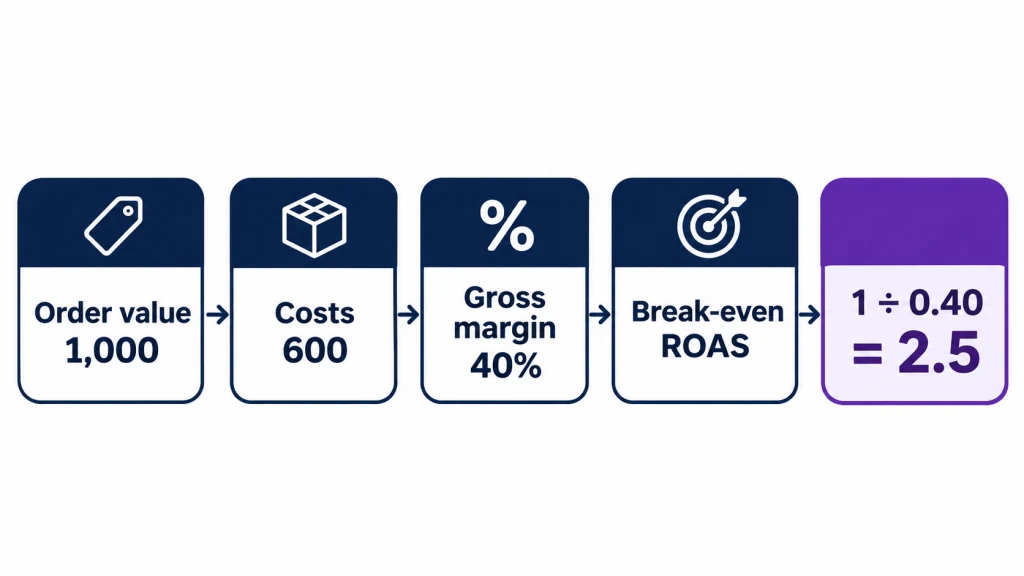
A ROAS of 4 sounds good, but it doesn’t tell you whether you made money. ROAS ignores what the product cost you. To know if a campaign is profitable you need the ROAS at which ads exactly pay for themselves.
Break-even ROAS = 1 ÷ gross margin
Use the margin after variable costs, such as product cost, payment fees, packaging, and shipping you subsidise. Here’s a worked example using illustrative numbers:
- Average order value: 1,000
- Product cost: 500
- Payment fees, packaging, and subsidised shipping: 100
- Gross margin: (1,000 − 600) ÷ 1,000 = 40%
- Break-even ROAS: 1 ÷ 0.40 = 2.5, or 250% in Google Ads
At a ROAS of 2.5, your ad spend is exactly covered by gross profit. Above it, you earn a gross profit on top of the ad cost. Below it, you lose money on each order. Treat break-even as a floor, since fixed costs such as salaries and software still need covering.
Break-even ROAS by margin
| Gross margin | Break-even ROAS | In Google Ads |
|---|---|---|
| 70% | 1.43 | 143% |
| 60% | 1.67 | 167% |
| 40% | 2.50 | 250% |
| 20% | 5.00 | 500% |
The lower your margin, the higher the ROAS you need just to break even. That’s why there’s no single “good” ROAS that applies to everyone.
What is a good ROAS?
There’s no universal answer. A good ROAS is one that clears your break-even ROAS with enough room to cover fixed costs and leave a profit. A business with a 70% margin can be profitable at a ROAS under 2, while one with a 20% margin needs a ROAS above 5 just to break even. Compare your own number to your own break-even, not to a figure from someone else’s industry.
ROAS vs ROI vs POAS
- ROAS: revenue ÷ ad spend. It ignores product cost and other variable costs.
- ROI: (profit − investment) ÷ investment. A campaign can have a healthy ROAS and still have a negative ROI if margins are thin.
- POAS (profit on ad spend): gross profit from ads ÷ ad spend. A value above 1 means the ads returned more gross profit than they cost. It needs product cost data for each order.
ROAS is the quickest to read, while ROI and POAS are closer to the truth about profit. For where ROAS fits among other measures, see our guide to marketing KPIs.
Target ROAS in Google Ads
Target ROAS is a Smart Bidding option that aims for an average return you set. You enter it as a percentage: 400% means you want 4 units of conversion value for every 1 spent, on average. In current Google Ads it’s set within the Maximize conversion value strategy for most campaign types.
Two cautions. First, it’s an average, not a floor, so individual days and campaigns can fall below it. Second, raising the target usually reduces volume, because the system becomes pickier about which auctions to enter. It also depends on accurate conversion values. Our guide to Google Ads bidding strategies covers when automated bidding makes sense.
A sensible target is your break-even ROAS plus a margin of safety, not a round number picked from a benchmark.
How to improve ROAS
- Cut wasted spend. Irrelevant search terms add cost without sales. Reviewing them and adding negative keywords raises ROAS without needing more revenue. See also how to find wasted budget in search terms.
- Fix tracking first. If conversion values are wrong, ROAS is wrong, and bidding will optimise toward the wrong target.
- Raise average order value. Bundles, upsells, and free-shipping thresholds increase revenue per click.
- Improve the landing page. A higher conversion rate means more revenue from the same spend.
- Improve your margin. A better margin lowers your break-even ROAS, so the same campaign becomes more profitable.
Common ROAS mistakes
- Treating ROAS as profit. It’s revenue per unit of spend, nothing more.
- Using a benchmark instead of your break-even. The right target depends on your margin.
- Ignoring attribution. ROAS depends on which sales the platform credits to your ads, and different platforms credit them differently.
- Judging a campaign too soon. A few days of data can swing ROAS widely.
FAQ
How do you calculate ROAS?
Divide the revenue your ads generated by the amount you spent on them. If you spent 1,000 and earned 4,000, ROAS is 4, or 400%.
What is break-even ROAS?
It’s the ROAS at which your ads exactly pay for themselves. Calculate it as 1 divided by your gross margin. At a 40% margin, it’s 2.5.
Is a ROAS of 4 good?
It depends on your margin. At a 40% margin, a ROAS of 4 clears the 2.5 break-even point comfortably. At a 20% margin, the break-even point is 5, so a ROAS of 4 would lose money.
What is the difference between ROAS and ROI?
ROAS compares revenue to ad spend and ignores costs. ROI compares profit to the amount invested. A campaign can have a high ROAS and a poor ROI when margins are thin.
How do I set a target ROAS in Google Ads?
Start from your break-even ROAS, add a safety margin, and enter the result as a percentage in your bidding settings. Remember it’s an average target, and raising it usually reduces volume.
Sources
- Relevant Audience: What is ROAS? Formula, break-even ROAS, ROAS vs ROI vs POAS and Target ROAS
- Klipfolio: Marketing Metrics and KPIs